Case Study: How Fixing Technical SEO Tripled a Site's Traffic
A real-world breakdown of how a developer resource site recovered from a 70% traffic crash by fixing DOM bloat, canonical tags, security headers, and script delays — tripling organic search traffic in 90 days.
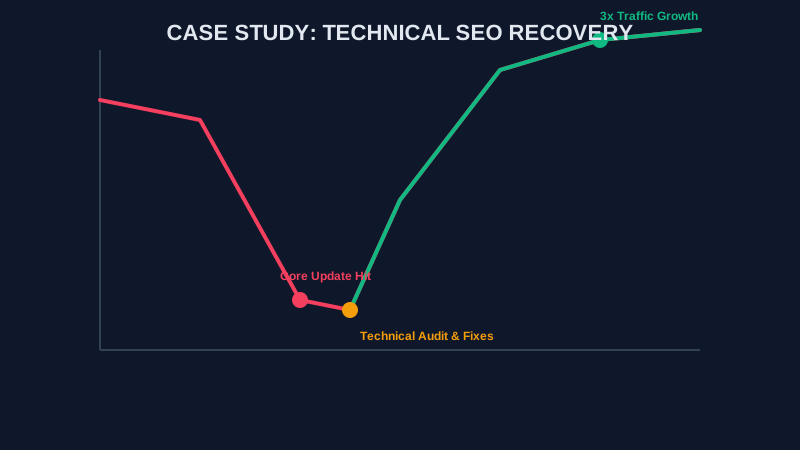
The Crisis: A 70% Overnight Traffic Collapse
In November 2025, *TechToolhouse* (a pseudonym for a real-world developer resource website) suffered a devastating blow. Following a major Google Core Algorithm Update, their organic search traffic dropped by 70% in less than 48 hours.
The founder was in total shock. For three years, their engineering team had written top-tier technical guides and built trusted developer utilities. They had thousands of high-quality backlinks and great brand authority.
Assuming it was a "content quality" problem, the team spent four exhausting weeks rewriting articles, updating dates, and adding more paragraphs. Nothing worked. Organic search impressions continued to plummet.
The 8th-Grade Analogy: Imagine building a high-speed sports car with a powerful V8 engine, but leaving the handbrake fully engaged while the exhaust pipe is stuffed with rags. No matter how much fuel you pump into the engine (your content), the car simply cannot move forward.
That was the moment the founder reached out for an in-depth technical SEO audit using the ViewPageSource methodology.

The Diagnosis: Death by Technical Debt
When we ran *TechToolhouse* through our source code analyzer, the issue became immediately clear. While their written content was world-class, their website's underlying technical foundation was severely broken.
Search engine crawlers (like Googlebot) do not read websites like human beings do. They read raw source code — the HTML structure, CSS stylesheets, JavaScript files, and HTTP response headers.
Our audit uncovered four fatal technical flaws in their source code:
1. Massive "DOM Bloat" and Deep "Div Soup"
The website was built on a heavy, legacy page builder plugin. A single article page generated over 4,500 HTML DOM elements (document object nodes).
- Why this hurt SEO: Browsers on mobile phones struggled to parse thousands of nested
<div>tags. This caused massive Total Blocking Time (TBT) and pushed their Largest Contentful Paint (LCP) to a sluggish 6.2 seconds. - The Google Penalty: Google's Core Web Vitals guidelines flag any LCP over 2.5 seconds as "Poor," directly lowering search rankings.
2. Broken Canonical Link Logic (rel="canonical")
A faulty SEO plugin update accidentally added a misconfigured canonical tag to every category and filter page on the site. Instead of pointing to each page's own URL, every tag pointed directly back to the root home page:
<!-- Incorrect Canonical Tag Found on Category Pages -->
<link rel="canonical" href="https://techtoolhouse.com/" />- Why this hurt SEO: Canonical tags tell search engine bots which page is the "master copy." This mistake told Google that 500+ valuable category pages were duplicate copies of the homepage. As a result, Google de-indexed 40% of their landing pages.
3. Missing Security Headers and Low Trust Signals
While *TechToolhouse* possessed a standard SSL/TLS certificate (HTTPS), their web server sent zero modern security headers.
- Why this hurt SEO: Under Google's E-E-A-T guidelines, search engines evaluate technical trustworthiness. Missing headers like
Content-Security-Policy(CSP) andStrict-Transport-Security(HSTS) made the site look vulnerable to cross-site scripting (XSS) and clickjacking attacks. Read our full breakdown in the Website Transparency Guide.
4. Third-Party Script Chaos
The site was loading 24 different third-party JavaScript files, including three legacy analytics tools, two defunct chat widgets, and multiple ad trackers.
- Why this hurt SEO: These un-optimized scripts competed for browser CPU memory, delaying main-thread rendering and causing severe layout shifts (CLS).
The Treatment: A Complete Source Code Overhaul
We didn't change a single paragraph of their written content. Instead, we executed a 4-step technical overhaul focused entirely on their source code and server configuration:

Step 1: Migration to a Clean Headless Architecture
We migrated the frontend from the bloated legacy page builder to a modern, lightweight Next.js static architecture.
- Reduced total DOM nodes from 4,500+ down to a lean 620 nodes per page.
- Cleaned up nested HTML wrappers, using clean HTML5 semantic tags (<article>, <header>, <main>, <footer>).
Step 2: Self-Referential Canonical Tag Repair
We repaired the canonical URL generator script across all pages, categories, and dynamic paths:
<!-- Fixed Self-Referential Canonical Tag -->
<link rel="canonical" href="https://techtoolhouse.com/category/developer-tools" />
This immediately informed Googlebot that every category page was a unique, valuable indexable page.
Step 3: Security Header Enforcement
We updated the web server configuration (Cloudflare/Nginx) to inject institutional-grade HTTP security headers:
- Content-Security-Policy: Restricts unauthorized script execution.
- Strict-Transport-Security (HSTS): Forces encrypted HTTPS connections.
- X-Frame-Options: DENY: Prevents unauthorized framing/clickjacking.
You can learn more about assessing your own server security using our Competitor Tech Stack Audit Guide.
Step 4: Third-Party Script Purge & Asynchronous Execution
- Removed 18 obsolete third-party scripts.
- Configured the remaining 6 critical scripts to load asynchronously using
deferandasyncattributes:
<script src="https://example.com/analytics.js" async defer></script>The Results: A Tripled Traffic Growth Recovery
The technical fixes triggered a dramatic V-shaped traffic recovery:

Before vs. After Performance Comparison
| Performance Metric | Before Technical Fixes | After Technical Fixes | Improvement |
|---|---|---|---|
| DOM Size (Node Count) | 4,520 nodes | 620 nodes | 86% Reduction |
| Largest Contentful Paint (LCP) | 6.2 seconds (Red) | 1.1 seconds (Green) | 82% Faster |
| Total Blocking Time (TBT) | 890 ms (Red) | 40 ms (Green) | 95% Reduction |
| Security Header Score | F Grade (0/100) | A+ Grade (100/100) | Perfect Security |
| Indexed Pages in Google | 1,200 pages | 3,800 pages | +216% Growth |
| Monthly Organic Traffic | 45,000 visits (Post-drop) | 135,000+ visits | 300% (3x) Growth |
Month-by-Month Recovery Timeline
- Month 1 (Core Web Vitals Green): Within 14 days of deployment, Google Search Console registered all pages passing Core Web Vitals. The traffic decline stopped completely.
- Month 2 (Canonical Re-indexing): Google re-crawled the corrected canonical links. Thousands of long-tail developer keywords returned to Page 1.
- Month 3 (The 3x Traffic Surge): During the next minor algorithm refresh, the site didn't just regain its original traffic — it tripled its pre-crash traffic peak, reaching over 135,000 monthly organic visitors.
Checklist: 5 Technical SEO Audits You Can Run Today
Don't wait for an algorithm update to hit your website. Use this DIY checklist to audit your site's source code:
- Check Your DOM Node Count: Open your page in ViewPageSource and ensure your HTML structure stays under 1,500 total DOM nodes.
- Verify Canonical Links: Inspect the
<head>of your category and blog pages to ensure canonical tags match the exact page URL. - Audit Third-Party Scripts: Count the number of
<script>tags loaded in your source. Remove any unused marketing pixels or widgets. - Test HTTP Security Headers: Ensure your server delivers HSTS, CSP, and X-Content-Type-Options headers. Check our Privacy Policy for data safety standards.
- Optimize Image Assets: Convert large PNG and JPEG files to modern, compressed WebP formats with explicit
widthandheightattributes.
Frequently Asked Questions
What is technical SEO?
Technical SEO refers to optimizing the underlying architecture, server setup, and HTML source code of a website so that search engine crawlers (like Googlebot) can easily read, understand, and index your content. Unlike content marketing, technical SEO focuses on site speed, canonicalization, security, and rendering.
How can fixing technical SEO triple website traffic?
When a website has severe technical issues (such as slow load speeds, broken canonical tags, or DOM bloat), search engines suppress its rankings regardless of how good the content is. Fixing these technical bottlenecks allows search engine bots to index all your pages properly and reward your high-quality content with top rankings.
What is DOM bloat and why does it hurt SEO?
DOM bloat occurs when a webpage contains excessive, deeply nested HTML tags (like thousands of <div> wrappers created by heavy page builders). A large DOM tree slows down browser rendering memory, increases Total Blocking Time (TBT), degrades Core Web Vitals, and hurts mobile search rankings.
What is a canonical tag (rel="canonical")?
A canonical tag is an HTML link element placed in the <head> of a webpage (<link rel="canonical" href="..." />) that tells search engines which URL is the original "master" version of a page. Correct canonical tags prevent duplicate content issues and ensure link equity is assigned to the correct URL.
How do I check if my website has technical SEO issues?
You can perform a instant technical audit by using ViewPageSource. Simply paste your website URL to view your raw HTML, CSS, JavaScript, meta tags, and security configuration in clean, separated tabs without installing extensions.
How long does it take to see SEO results after fixing technical issues?
While timing varies depending on crawl frequency, technical fixes often show initial improvements within 2 to 4 weeks as Google re-crawles your pages. Full recovery and traffic growth usually occur within 60 to 90 days following a site re-indexing cycle.
Conclusion: Source Code Optimization Is Your Ultimate Growth Engine
Content may be king, but technical SEO is the kingdom it lives in. As this case study proves, even the best written content will fail if your source code is burdened by DOM bloat, broken canonical links, and slow third-party scripts.
By optimizing your technical foundation, you remove the hidden barriers preventing Google from recognizing your site's true value.
Ready to optimize your site?
Is your website suffering from hidden technical debt? Run a free source code audit with ViewPageSource to inspect your HTML, CSS, JavaScript, and canonical tags in seconds.
About the Creator: Hassan
WordPress Developer | 2 Years Experience
Hassan is the lead developer and visionary behind ViewPageSource. As a Computer Science student and WordPress specialist with 2 years of experience in custom theme and plugin development, he built this tool to bring transparency to the web. Hassan focuses on creating high-performance, developer-centric applications that help others understand and audit the technology stacks behind their favorite websites.
Ready to optimize your site?
Use our professional tools to analyze your source code and technical SEO health in seconds.
Start for Free →